
Content Removal › Court Records › Docket Alarm
Docket Alarm Removal Service
Is a lawsuit, bankruptcy, or criminal case on DocketAlarm.com showing up when people search your name? We get the docket and its filings suppressed on Docket Alarm, remove the result from Google and Bing, and clean up the other court record sites and AI tools that copied the case. Pay after removal is available, and if we can’t remove an agreed link, you get your money back.
- ✓ Pay after removal available
- ✓ Money-back guarantee on agreed removals
- ✓ Free, confidential Docket Alarm case review
- ✓ Firm quote before any work starts
- ✓ 10+ years, 10,000+ records removed
Reviewed by Joe Chierotti, Defamation Defenders · Updated October 2026
Can you remove a case from Docket Alarm?
Yes, in many cases. Docket Alarm is a private litigation research platform that republishes docket sheets and court filings from federal courts (via PACER), state courts in more than 40 states, and federal agencies. It is not the court. Docket Alarm has its own suppression process: when a case implicates personal privacy, it can hide the docket page so it no longer appears on the site or in its public search.
The catch is that Docket Alarm reviews every request individually and can deny it, and it does not control Google. A suppressed page can keep showing in search results with your name in the snippet for weeks, and the same case is usually copied to PacerMonitor, Justia, UniCourt, CourtListener, and people-search sites. Defamation Defenders handles all of it, Docket Alarm first, then Google, Bing, and every other copy, and confirms each result is gone.
Key facts about Docket Alarm case removal
- Docket Alarm covers a lot. Federal district, bankruptcy, and appellate courts, state trial and appellate courts in 40+ states, and agencies such as the PTAB, TTAB, ITC, NLRB, and Tax Court.
- Removal means suppression. Docket Alarm suppresses the page rather than deleting the public record. Once approved, the case stops showing on the site.
- Requests are judged case by case. Privacy-related cases are the strongest candidates. Cases with strong public interest, cases with companies on both sides, and attorneys asking to be disassociated from a case are typically declined.
- One link per request. A single case can have a docket page plus separate pages for individual filings. Each URL needs its own request with a short written reason.
- Google is a separate step. Docket Alarm does not control search engines. The old title and snippet stay on Google until an outdated-content request is filed and approved.
What Docket Alarm will and won’t remove
Docket Alarm’s published policy is short: it suppresses cases that implicate personal privacy, and it declines cases with a strong public interest. Here is how that plays out in practice.
Cases involving minors
Docket Alarm says it automatically suppresses cases that mention minors. If a case involving a child is still showing, or a minor is identifiable even though they are not named, a request is usually a strong one.
Divorce, family law, and Social Security cases
Docket Alarm also says it automatically suppresses cases that are clearly personal, naming divorces and Social Security matters as examples. If yours is still on Docket Alarm, it slipped through and should be requested. If it is showing on PacerMonitor, Justia, or UniCourt instead, those sites need their own requests.
Cases that could lead to harassment
Harassment risk is one of the grounds Docket Alarm names directly. Cases tied to stalking, domestic violence, threats, or a dispute with someone who is still targeting you are strong candidates, especially when the page exposes where you live or work.
Other personal privacy cases
Many cases are not suppressed automatically but still implicate personal privacy, and Docket Alarm reviews them case by case:
- Personal bankruptcies, especially older ones that were discharged
- Employment, discrimination, or wrongful termination suits you brought as an individual
- Medical, disability, and personal injury cases
- Older civil suits where you were named as a private individual
- Dismissed charges and acquittals
With these, the outcome depends on how clearly the request explains the privacy harm within Docket Alarm’s 300-character limit, and on the documentation behind it.
Sealed and expunged cases
A sealing or expungement order is strong evidence that a case is no longer meant to be public. Docket Alarm’s policy does not mention court orders, but including the order makes a privacy request much harder to deny.
What Docket Alarm won’t remove
- Cases with a strong public interest, such as those involving public officials, high-profile defendants, or ongoing news coverage
- Cases where corporations are on both sides, such as commercial, contract, and patent disputes between companies
- Requests from legal professionals who want their name disassociated from a case they worked on
Docket Alarm also reserves the right to deny any request or to make no decision at all. If your case falls into one of these groups, we tell you before you pay, and we can often still push the Google result down with search result suppression.
Why a Docket Alarm listing hurts, even if you did nothing wrong
Docket Alarm is built for lawyers, but its docket pages and filing pages rank in Google for ordinary names. A result shows your name, the court, the case number, and sometimes the full text of a complaint or motion, with no context about how the case ended.
Employers and background checks
The filings themselves are online
Lenders, landlords, and partners
AI tools repeat it
What we remove from Docket Alarm
Civil and personal cases
- Lawsuits you won, settled, or were wrongly named in
- Divorce, custody, and family law cases
- Personal injury and employment suits
- Debt collection, eviction, and small claims cases
- Cases involving minors or medical details
Federal and bankruptcy cases
- Chapter 7 and Chapter 13 bankruptcy filings
- Federal civil suits republished from PACER
- Dismissed or acquitted federal criminal cases
- Social Security and disability appeals
- Individual filing pages (complaints, motions, exhibits)
Criminal and sealed cases
- Dismissed or dropped charges
- Not-guilty verdicts and acquittals
- Sealed and expunged cases still listed
- Completed diversion or deferred judgment cases
How to remove Docket Alarm from Google
Even after Docket Alarm approves a suppression, Google can keep showing the old title and snippet, with your name in it, for weeks. Here is how we clear it:
- Suppress the source first. We get every Docket Alarm URL for the case suppressed so the page no longer shows your information.
- File outdated-content requests. We use Google’s and Bing’s outdated-content tools for each suppressed URL so the cached title and snippet are dropped.
- Catch the document pages. Docket Alarm often has separate URLs for the docket and for individual filings. We find and clear each one, not just the main case page.
- Verify by name search. We search your name the way an employer would and confirm the Docket Alarm result is gone from Google, Bing, and AI answers.
Need the same process for other sites? See our Google deindexing service.
Which Docket Alarm cases are easiest to remove?
We tell you up front what is realistic.
| Likelihood | Typical situations |
|---|---|
| Strong candidates | Cases involving minors, divorce and family law, Social Security and medical matters, bankruptcies of private individuals, sealed or expunged cases, dismissed charges, and private people named in civil suits |
| Case-by-case | Business disputes where you are named personally, recent civil lawsuits, judgments that were paid or vacated |
| Hardest | Cases with strong public interest, company-versus-company litigation, and requests to remove an attorney’s name from a case. When a page cannot be suppressed, we can often still push the Google result down with search result suppression. |
If we do not think we can remove your Docket Alarm listing, we will say so before you pay, not after.
Our Docket Alarm removal process
Free confidential audit
Send us your name or the Docket Alarm link. We find every Docket Alarm URL tied to the case, including filing pages, plus copies on PacerMonitor, Justia, UniCourt, CourtListener, people-search sites, and AI answers.
Firm quote and guarantee
You get a link-by-link plan: what can be removed, the method for each site, the timeline, and a firm price. Nothing starts until you approve it.
Docket Alarm suppression
We prepare a request for each URL with a reason written to fit Docket Alarm’s privacy criteria, backed by your dismissal, sealing, or expungement paperwork where it helps, and follow up until it is decided.
Google, Bing, and AI cleanup
We clear the outdated Docket Alarm results from search engines, then remove the other copies of the case on our list.
Verification and monitoring
We confirm each result is gone and send you a report. Optional monitoring alerts us if the case resurfaces or shows up on a new site.
How long does Docket Alarm removal take?
Each stage runs on a different clock. Here is what to expect:
| Stage | Typical timing |
|---|---|
| Docket Alarm decision | About five business days, per Docket Alarm’s own policy |
| Suppression on Docket Alarm | Immediately after the request is approved |
| Google and Bing | Can take several weeks on their own. We file outdated-content requests for each URL to speed this up. |
| Other docket and people-search sites | Varies by site, from a few days to several weeks |
| ChatGPT and AI Overviews | Follow once the sources are suppressed and dropped from search |
Your quote includes an estimated timeline for each link, and with pay after removal, you are not paying while you wait.
Why Docket Alarm requests get denied, and how we avoid it
Docket Alarm can deny a request or simply make no decision on it. Most denials come from requests that do not explain why the listing is a privacy problem, or that cover only one of several URLs for the same case.
What strengthens a Docket Alarm removal request
- A clear privacy reason that fits Docket Alarm’s criteria, written within its 300-character limit
- A signed sealing or expungement order, if you have one
- Dismissal order, judgment of acquittal, or bankruptcy discharge
- Proof that you are a private individual, not a business or public figure
- Every URL for the case: the docket page and each filing page
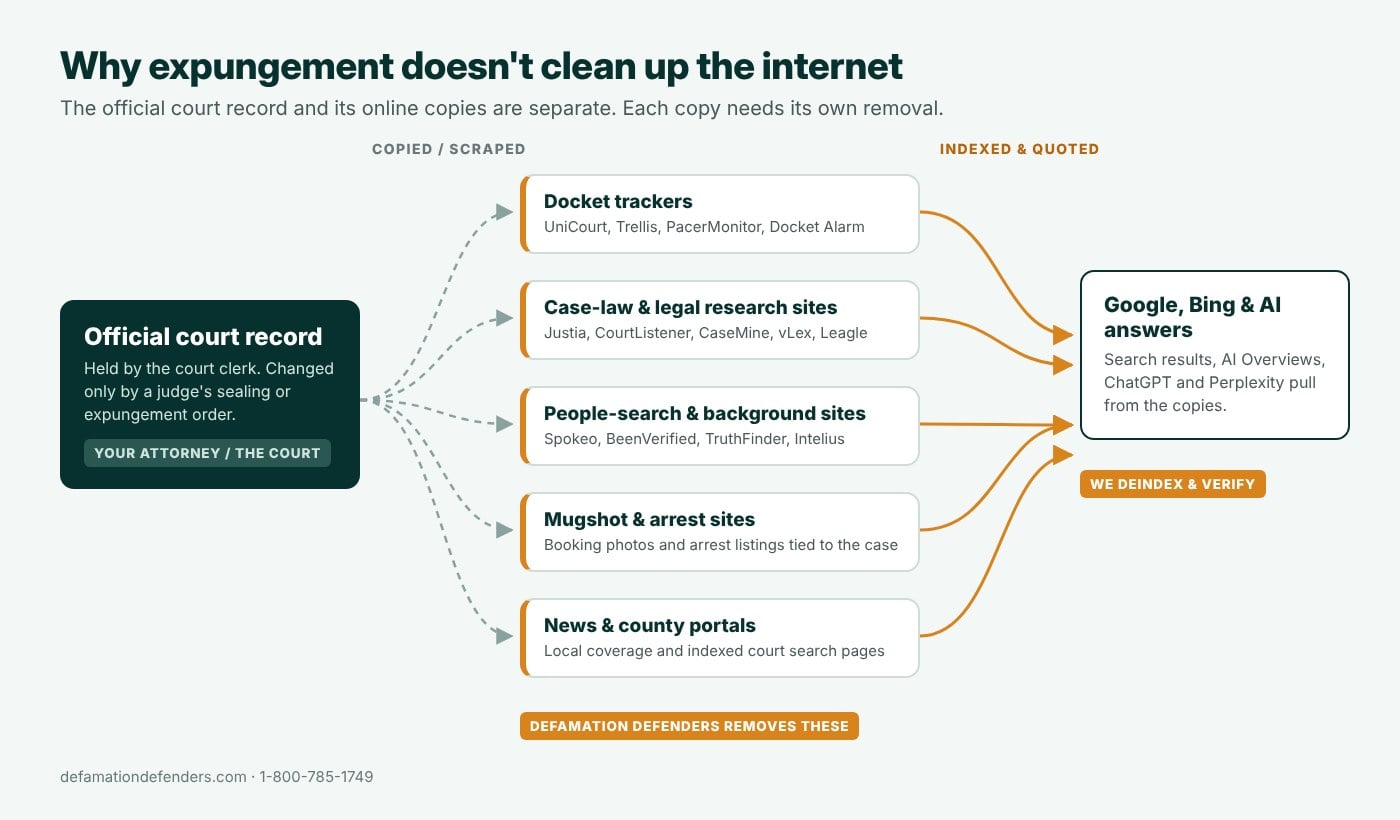
An expungement or sealing order tells the court and government agencies to restrict your record, but it does not automatically update Docket Alarm or any other private website that copied the case. Those sites keep showing it until someone sends them proof.
Will my case come back on Docket Alarm?
It can. Docket Alarm keeps pulling new data from PACER and state court systems, and so do the other docket sites. A suppressed page usually stays suppressed, but a case can resurface when:
- New filings are added. Activity on the docket can create new filing pages that were not part of the original request.
- A related case gets its own page. An appeal, a refiled case, or an adversary proceeding in a bankruptcy is a separate URL.
- Another site re-scrapes the record. PacerMonitor, Justia, UniCourt, and people-search sites pull from the same courts on their own schedules.
How we keep it from coming back
- Every URL, not just the docket. We suppress the case page and each filing page, so there is no leftover copy for Google to surface.
- Backed by the court record where possible. If your case has been sealed, expunged, dismissed, or discharged, we include that paperwork so the suppression rests on the case’s actual status.
- Free re-removal. If a court record we removed is re-posted on the same site, we remove it again at no additional cost.
- Optional monitoring. We watch Docket Alarm and the other docket sites for your name and act early if the case shows up again.
Ask any removal company what happens if the case comes back. Our answer is in writing: we remove it again at no extra charge. See our full removal guarantee below.
Can you remove yourself from Docket Alarm?
You can. Docket Alarm offers a free removal form and usually decides within about five business days. Where people get stuck is everything around it: writing a reason that gets approved, finding every URL for the case, clearing Google, and tracking down the other sites that published the same docket.
How to submit a Docket Alarm removal request yourself
- Copy the full URL of the Docket Alarm page, for example docketalarm.com/cases/…. Filing pages have their own URLs, so collect each one.
- Open Docket Alarm’s removal form at docketalarm.com/Remove and enter your name, email, phone number, and the link.
- Write a one- or two-sentence reason (300 characters maximum) that explains the privacy harm, such as a minor involved, personal financial or medical details, or a risk of harassment.
- Submit and repeat for every other URL. Docket Alarm usually emails a decision within about five business days.
- Clear Google and Bing. After approval, use Google’s and Bing’s outdated-content tools so the old title and snippet drop out of search results.
Where do-it-yourself requests go wrong
- A vague reason. “I want this removed” gives Docket Alarm nothing to approve. The reason has to show a privacy harm.
- Missed filing pages. The docket page comes down, but a complaint or motion page keeps ranking for your name.
- No Google follow-up. The suppressed page can stay in search results with your name in the snippet for weeks.
- Other sites ignored. The same case is still on PacerMonitor, Justia, UniCourt, or people-search sites.
| Doing it yourself | Defamation Defenders | |
|---|---|---|
| Docket Alarm pages | One form per URL; easy to miss filing pages | Every Docket Alarm URL for your case found and submitted |
| Request wording | Generic reasons are often denied | Reasons written to fit Docket Alarm’s privacy criteria |
| Google and Bing | Separate tools; old snippet often lingers | Outdated-content requests filed and verified for each URL |
| Other docket sites | Not covered | PacerMonitor, Justia, UniCourt, CourtListener, people-search sites, and more |
| If it comes back | Start over | Re-removal at no extra cost |
| If it fails | Your time | Money back on any agreed removal we cannot complete |
Defamation Defenders vs. other Docket Alarm removal services
Several companies offer Docket Alarm removal. Before you hire anyone, compare what is actually in writing:
| Defamation Defenders | Typical removal services | |
|---|---|---|
| Pay after removal | Available | Some offer it; many require payment up front |
| Written money-back guarantee | Yes, on every agreed removal | Often implied, rarely defined |
| Free re-removal if it comes back | Yes, in writing | Usually not addressed |
| Every filing page, not just the docket | Included | Often only the main case page |
| Google and Bing cleanup | Included for every URL | Varies |
| PacerMonitor, Justia, UniCourt, and others | Every copy listed in the free audit | Varies |
| AI answer checks | Before and after the project | Rarely |
| Firm price per link before work starts | Yes | Often “depends on the case” |
Questions to ask any provider: Do I pay before or after removal? What happens if the case comes back? Does the price include Google and the other sites?
Pay after removal. Money back if we can’t remove it.
Most Docket Alarm removal services ask you to trust them. We put it in writing: pay after removal is available on Docket Alarm projects, and every agreed removal is backed by a money-back guarantee and free re-removal.
Pay after removal
Pay after removal is available: you pay once the Docket Alarm page is suppressed, instead of paying up front and hoping it works. Payment plans are available for multi-site projects.
Money-back guarantee
If we agree to remove a Docket Alarm listing and cannot, you get a full refund for that removal.
Re-removal at no extra cost
If a court record we removed is re-posted on the same site, we remove it again at no additional charge.
Firm price up front
You see the exact price per link before work begins, with discounts when your case appears on multiple sites. All major credit cards and Zelle accepted.
What our clients say
Defamation Defenders has spent more than 10 years removing records and cleaning up search results, with more than 10,000 records removed. Here is what clients have said about working with us.


Docket Alarm removal FAQs
How do I remove my case from Docket Alarm?
Docket Alarm accepts suppression requests through its removal form, one link at a time, with a short written reason. It reviews each request and usually decides within about five business days. Privacy-related cases are the strongest candidates. We prepare and submit these requests for you, follow up, and confirm the result.
How do I remove Docket Alarm from Google?
First get the Docket Alarm page suppressed. Then file outdated-content requests with Google and Bing so the old title and snippet are dropped. Docket Alarm does not control search engines, so this has to be done separately for every affected URL.
Why is my name on Docket Alarm?
Docket Alarm collects docket sheets and filings from federal courts, state courts, and federal agencies and publishes them for legal research. If you were a party to a case in a covered court, your name can appear even if the case is closed.
What information does Docket Alarm show about me?
A Docket Alarm case page typically shows your name as a party, the court, the case number, the filing date, the case type, every docket entry, and the attorneys involved. Many cases also have pages for individual filings, which can include the full text of complaints, motions, and exhibits, and sometimes addresses, financial details, or allegations that were never proven.
Does Docket Alarm charge to remove a case?
No. Docket Alarm does not charge for suppression. Our fee covers preparing requests that get approved, finding every URL for the case, clearing Google and Bing, and removing the copies on other sites.
Will Docket Alarm remove my bankruptcy?
Bankruptcies filed by private individuals are often good candidates because they involve personal financial details. Each request is reviewed individually, and we tell you during the free review how likely approval is.
Can I remove a Docket Alarm case if I was convicted?
It is harder, but not always impossible. Recent convictions with no other privacy basis are usually declined. Older cases, cases where the sentence was completed, and convictions that were later sealed, expunged, or set aside are much stronger candidates. If Docket Alarm will not suppress the page, we can often still push it down in Google with search result suppression.
Why was my Docket Alarm removal request denied?
Docket Alarm typically declines cases with strong public interest, cases with companies on both sides, and attorneys asking to be disassociated from a case. Requests with vague reasons are also often denied. We review your case and the denial, and resubmit where there is a stronger basis.
Can I resubmit a Docket Alarm request after a denial?
Docket Alarm does not publish a formal appeal process, but a new request with a stronger basis can succeed. That usually means new documentation, such as a dismissal order, sealing or expungement order, or bankruptcy discharge, or a privacy reason the first request did not explain. We review the denial and only resubmit when there is a real basis to do so.
How long does Docket Alarm removal take?
Docket Alarm usually decides within about five business days, and an approved page is suppressed on the site right away. Google and Bing can take longer to drop the old result, which is why we file outdated-content requests for each URL.
How much does Docket Alarm removal cost?
Cost depends on how many Docket Alarm pages and other sites list the case and what type of case it is. We give you a free, firm quote per link before any work starts, with discounts for multi-site projects. Pay after removal is available, so you don’t have to pay up front and hope it works.
Can lawyers still see my case after it is suppressed?
Yes, through official channels. Suppression changes what the public sees on Docket Alarm and in search results. The official record stays with the court and remains available through PACER or the state court system, so attorneys and courts can still access it there. What changes is that the case no longer shows up when someone searches your name.
Will removing my case from Docket Alarm take it out of ChatGPT and Google AI Overviews?
Over time, yes. AI tools build their answers from indexed web pages. Once the Docket Alarm page is suppressed and dropped from Google and Bing, AI tools lose that source. We check ChatGPT, Google AI Overviews, Perplexity, and Copilot for your name before the project and again after the sources are gone.
What if my case comes back on Docket Alarm?
Docket Alarm and other docket sites keep pulling data from the courts, so new filings or related cases can create new pages. If a court record we removed is re-posted on the same site, we remove it again at no additional cost, and optional monitoring alerts us early if your case shows up again.
Is Docket Alarm the only site showing my case?
Rarely. The same case is usually also listed on PacerMonitor, Justia, UniCourt, CourtListener, DocketBird, Trellis, PlainSite, and people-search sites. Our free audit lists every place your case appears, so you can see the full picture before deciding what to remove.
Will removing my case from Docket Alarm also remove it from PacerMonitor and Justia?
No. Every site is a separate project with its own policy. Our audit lists every copy of the case so you can clean up all of them at once. See our court records removal service, Trellis Law removal, and Justia removal pages.
Can I sue Docket Alarm to force removal?
In practice, this rarely works. Republishing accurate public court records is generally lawful, so a lawsuit to force removal is unlikely to succeed and costs far more than the removal process. Docket Alarm’s own suppression process, combined with search engine removal, is the faster and cheaper route. Defamation Defenders is not a law firm; speak with an attorney about legal options.
Is Docket Alarm removal legal? Do I need a lawyer?
Yes, it is legal. We do not alter official court files. We use Docket Alarm’s own removal policy, search engine removal processes, and your lawful court orders. You only need a lawyer if you want the official court record sealed or expunged. Defamation Defenders is not a law firm and does not give legal advice.
Is my case kept confidential?
Yes. Your review is free and confidential, and we never publish client names or case details.
Find out if your Docket Alarm case can be removed, free
Send us your name or the Docket Alarm link. We’ll show you every place your case appears and give you a firm, guaranteed quote. Call 1-800-785-1749, Monday to Saturday, 8 AM to 6 PM.
Defamation Defenders is an online reputation and content removal company, not a law firm, and nothing on this page is legal advice. We are not affiliated with Docket Alarm, vLex, or Clio We do not alter official court records. Results depend on each publisher’s policies and the facts of your case. Last updated October 2026.
Published · Last updated by the Defamation Defenders team